Why download updates at all without the user knowing? Is prompting before downloading such an awful user experience in comparison? Or, you know, prompt once per day and add a 'remind me in x days/minutes' option?
The whole take-away of this article feels backwards. Instead of going 'hey maybe we should not just download stuff in the background without prompt', the author doubles down and actually proposes to add a way for the server to signal to the client that an update should be forced.
Well, if the user wants the update, downloading in advance is a much better experience, because you only get interrupted once, for a restart that only takes a second or two.
That's in contrast to being interrupted twice (once to download, then again to restart) or a single long interruption (shutting down, then downloading, then restarting).
Of course, it's a different matter if the user doesn't want the update. But we developers don't like to think about that :)
An easier fix could be to just add a toggle so users can decide for themselves if they are fine with the app downloading unprompted or not. (This is just based on the post, the app could very well be behaving that way already but since the post doesn't mention it, I'm assuming it does not).
But also: a check every 5 minutes? I understand what you're saying but the only reason those interruptions are frustrating is because of the high volume of daily updates. This could be solved by just keeping this update-frequency reserved for beta users and maintaining a more sane update-frequency for regular users (now what a sane update-frequency is, is a whole other discussion judging by the comments so far :P)
Now I’m not saying coding is rocket science (because it isn't), but there are certain types of people who are a little (too?) obsessed with thinking of ways their logic can break and covering it with checks and tests… I'm guessing that designers are less likely to be one of those.
I love designers, btw. I think UI/UX is a hugely underrated discipline (see: "dark patterns", designing for safety). But unless you stare at logic all day, the implications of a code change like this might not immediately strike you as a risk.
I agree with you. Bugs happen, that's just the way it is.
But my issues with this aren't really related to code:
* downloading without user 'consent' (in the loosest sense of the word)
* and mainly: a proposed fix being a way the server can force an update on the user.
This whole issue just stems from the unreasonably high update-frequency imposed by the developer. They aren't addressing that and instead conclude that perhaps they can avoid a high bill by building remote code-execution into their app. As opposed to just adding a toggle and letting users decide whether they want updates to be auto downloaded. I would argue that's more of a UI/UX issue than a coding issue.
> Why download updates at all without the user knowing? Is prompting before downloading such an awful user experience in comparison? Or, you know, prompt once per day and add a 'remind me in x days/minutes' option?
Yeah, it's a pain in the neck. If I've got 20 bits of software on my PC and they all update once a month, then most days I'm going to get a random popup asking to update. Just get on and do it please.
That's fair. From the post my impression was that auto-update is forced, so users don't get a say in whether it can download in the background, if that's not the case then disregard that part of my comment.
The article did not mention that as far as I can tell.
>The app checks for the update every 5 minutes or when the user activates the app.
>Normally, when the app detected the update - it downloaded it and stopped the 5 minutes interval until the user installed it and restarted it.
To me this reads as them downloading the update unprompted (as they mention their issue with the previous updater was that it would prompt the users every 5 minutes, which would be solved by just not checking every 5 minutes).
Either way, whatever the bug and its effects are, my gripe is that their conclusion is to add a way for them to remotely force-updates. As opposed to just notifying once or any of the other hundred ways to handle auto-updates that don't involve you remotely forcing an update.
Edit: the founder has confirmed in the comments the app does download without user confirmation, so my original point still stands.
Yeah, I agree with you. The rumors that have been going around didn't make much sense IMO. (Has Nintendo ever done a hardware upgrade that would have been as drastic? Genuinely asking).
Also yes, the original kickstand made me wonder if anyone at Nintendo had actually tried to use it more than once. It's by far my least favorite part of the Switch.
Thanks for the list! I didn't knew about the 'New' 3DS.
Though, I would still argue a 4K upgrade is a little far fetched. Nintendo hardware has always been less powerful than that of its 'competitors', who only recently started pushing 4K. (whether or not Nintendo actually competes with Sony and Microsoft is a whole other discussion :P).
> The only handheld generation where Nintendo didn't do this was the GBA, so it's very common.
Since we're talking things that affect portability/battery life in general: The GBA SP, aside from being their first foldable handheld, was the first with an internal light and a built-in rechargeable battery (instead of taking AA or AAA batteries).
Nitpicky, but the New 3DS isnt more than 8 times faster than the Old 3DS: it has a quad core 800MHz processor instead of a dual core 268MHz processor. Even with perfectly scaled multi-threaded code, thats only a ~6x increase.
No idea how that happened, I guess I simply forget the dualcore cpu on the original model. But to one-up the nitpicky-ness one could argue that the "real" game performance still has a more than 8x increase, since both models seem to reserve one core for the OS.
Nintendo did an upgraded 3ds called "New 3ds" that had a better chip and could run games the regular 3ds couldn't. The only prominent one being a port of the Wii game Xenoblade that they clearly couldn't get working on the regular 3ds.
Those original consoles are becoming more rare, you could have probably sold it for close to what you originally paid for it, exactly because of that older SoC!
As far as I know, not every original SOC switch has this exploit, just ones from the first year of production or so. There are tools to lookup your serial number and see if you have a valid model. My switch has the homebrew exploit, but none of my friends' switches do, and they're all the first switch model but mine was purchased a few months earlier than the others.
WhatsApp actually provides an APK download on their website[0]. I'm not entirely sure whether they keep it as up-to-date as the version on the play store though.
I would even go as far as to suggest setting up your email with your own domain. This way switching providers is as easy as just changing a few DNS settings.
I've been running that setup for a few years now and it has been flawless. Spam is almost entirely gone, with a catch-all address I can simply sign up to websites with <website name>@mydomain, makes it easy to track down if one of them ends up doing shady things with your mail!
I personally have a "vanity" domain that spells out my last name (the TLD forms the last two letters). So I just have <firstname>@<domain> for personal stuff, and then for example git@<my domain> for github, spotify@<my domain> for spotify etc.
The mail@firstnamelastname.com approach seems like a clean way to do it as well.
I feel the reddit post is much better at demonstrating the mod :) Might be nice if the post's URL was updated to the post rather than the curseforge page.
You could get older server hardware pretty cheap, and just run everything on a single physical machine, no?
For example, I picked up about 96 GB of DDR3 ECC ram for around 75 euros. A quick check on ebay, and the same amount of DDR4 is selling for at least _twice_ as much.
I imagine it's pretty economical to buy this older hardware and just assemble a single beefy server, instead of buying multiple physical machines.
The added benefit is that this older hardware doesn't end up in a landfill, and even though older CPUs generally consume more power than their current gen equivalent, I reckon a single machine would consume about the same, or less, than multiple NUCs (I have no source to back that up though, it's just my assumption).
Server hardware is designed to run in server environments, not home environments. Maybe if you had a basement or something, but the noise on those fans is going to drive you nuts. Off the shelf home desktop hardware is better, but amazingly inconsistent. The NUC platform isn’t a bad way to go if you have the cash.
You're absolutely correct about the noise. Those 1U servers sound like a jet taking off pretty much the entire time they run. However, there's plenty of motherboards that are ATX (or E-ATX), so they fit in regular cases with little to no modifications. (Though, I just keep mine in my attic)
I agree the NUC is a great platform, but if you could spend less cash and get more bang for your buck, and perhaps have the added benefit of having a platform with ECC memory (not sure if the NUC supports ECC, I'm assuming it doesn't), then I think the latter is what most people would go for (or well, at least what I would go for :p).
We're also talking about home _servers_, so it doesn't seem that odd to me to use actual server hardware. The homelab[0] subreddit has a bunch of folks running actual server hardware for example.
Or drive your family nuts, who will take you with them.
I had plans to build a noise isolated data closet in the basement (tied into the furnace air return) but I never ended up with the right sort of basement.
He wants the fun homelab not savings. His particular NUCs are ~$600 a piece, the nas was a few $k as well. Definitely you can get more compute on a single node but I think you'd be missing the point.
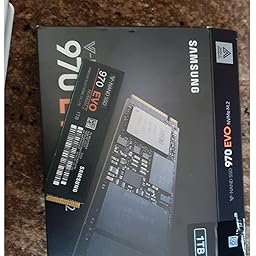
There seems to be a real problem with those Samsung SSD's on Amazon. There's quite a few reviews where people even received a fake SSD, the only thing that gives it away is the connector[0]! I decided I wouldn't take the risk and bought mine elsewhere.
The thinkpad T470/T480 dual-pipe dGPU heatsink is a drop-in replacement for the iGPU version, so if you buy the version without dGPU, you can pretty easily double your heatpipes quite cheap.
> 2) {- comment -} probably comes from another language (which one?) but I'm always surprised by the cleverness of language designers, even when there is no need for it.


The whole take-away of this article feels backwards. Instead of going 'hey maybe we should not just download stuff in the background without prompt', the author doubles down and actually proposes to add a way for the server to signal to the client that an update should be forced.
I'm actually baffled by this entire thing.